


Investing.com: Stock Market
4.711.40K Reviews
App Specs
- Version
- 6.49.1
- Updated On
- License
- Free
- Downloads
- 50,000,000+
- Developer
- INVESTING.com
- Categories
- Finance
- Platform
- Android, iOS
Screenshots



 Analysis by AppCompare
I treat a market app as a quick reference, not as a substitute for research or financial advice. On that basis, Investing.com: Stock Market is appealing because it brings market information, watchlists, charts, and news together instead of making me jump between several sources. It is a free finance app from INVESTING.com, and its broad mix can suit anyone who wants a regular view of what is moving without turning every check-in into a full research session.
Quick checks and realistic speed expectations
For an app built around changing market information, speed matters most when I need to answer a simple question quickly: what is happening to an index or a company I follow? The experience described here feels geared toward that kind of glance-and-go use, with market overviews and watchlists providing a route to familiar items. I would still treat “real time” as a reason to check the timing and source of any quote before acting, rather than assuming that a phone display alone is enough for a time-sensitive trade.
A practical way to make the app feel more responsive is to keep a focused watchlist rather than trying to monitor every interesting ticker. I would separate long-term holdings from short-term ideas, then open the relevant list instead of repeatedly searching. That small bit of housekeeping reduces visual clutter and makes it easier to notice a meaningful move. It also prevents a common trap: spending more time refreshing prices than deciding what information actually matters.
What happens during a busy market session
When several markets are active, this app’s breadth is useful but can also make a session feel busy. Stocks, indices, commodities, cryptocurrencies, news, and economic events all compete for attention. I would use it with a specific question in mind—for example, checking whether a company move coincides with a wider index change—rather than opening every section in sequence. The advantage is context; the trade-off is that a large feed can make it easier to follow noise instead of the few signals that affect a personal plan.
One helpful workflow is to check a watchlist first, then open a chart only for an item whose movement deserves a closer look, and finish with relevant news or calendar information. This order keeps headlines from steering the whole session before I know what has actually changed. It is especially useful around earnings or major economic releases, when a dramatic headline may explain a move but does not automatically tell me whether it changes my longer-term view.
Reliability, context, and sensible recovery
I value reliability in a market app less as a promise that nothing will ever pause and more as a tool that lets me regain context without starting my research from scratch. Watchlists and a repeatable checking routine help with that: if I return after being away, I can review the same symbols and then look for the news or event behind a change. I would avoid making an irreversible decision from a single screen, particularly if a quote appears surprising; reopening the relevant item and checking its chart and surrounding news is a sensible second look.
The app’s combination of market data and editorial material is convenient, but it also calls for some separation of roles. A chart can show a price pattern, a news item can offer an explanation, and an opinion piece can argue for an interpretation; those are not interchangeable forms of evidence. I find the app more useful when I treat analysis as a prompt for questions rather than as an instruction to buy or sell. That habit matters especially for newer investors, who may otherwise confuse confidence in an article with certainty about an outcome.
Worth Reading Before You Choose

Baby Panda World Brings Quick Play to Modern Phones, but Its Game Library Feels Busy

ESPN’s Live Game View Makes Following Close Games Easier

QuizzLand Review: A Good Fit for Short Trivia Breaks, Not Every Player

Basketball Stars: Multiplayer Is Fast, but Can It Recover When Matches Go Wrong?

WEBTOON Turns Phone Updates Into a Better Reading Routine

Link to Windows Runs on Shared Habits, Not Social Feeds
Device limits and attention costs
On a phone, detailed charts and dense financial headlines naturally ask for more concentration than a quick quote check. I would not expect a small screen to replace a desktop setup for comparing many instruments or doing extended technical analysis. The app is better suited to checking a shortlist, reading an update, or reviewing a chart while away from a larger screen. If I need to compare several time periods or build a detailed investment case, I would move to a broader research setup rather than force the whole task onto mobile.
Resource demands can vary with the device, network, and how much content I am viewing, so I would not assume every phone will behave identically. A sensible approach on an older or crowded device is to keep the session focused, close out of sections I no longer need, and avoid treating a brief delay as proof that market information is wrong. The app’s current version is 6.45, and it supports devices running Android 7.0 or later; those details help with basic compatibility, but the feel of any data-heavy app still depends on the phone and connection.
First Impressions
As soon as I opened the app, I was greeted with a sleek and intuitive interface. Investing.com: Stock Market makes it super easy to navigate through the vast ocean of financial data. Whether you're a newbie or a seasoned trader, the app is designed to cater to all levels of expertise.
Features That Stand Out
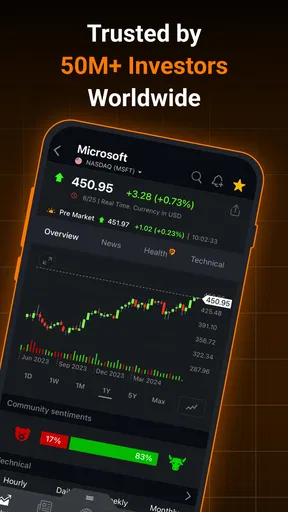
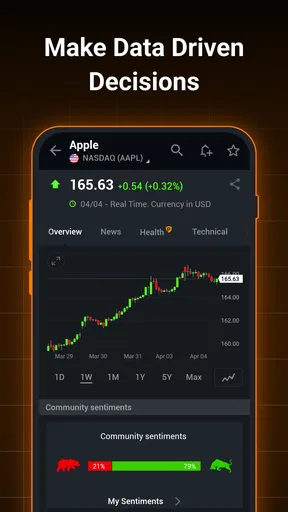
One of the first things I noticed was the comprehensive market overview. You get real-time data not just for stocks, but also for indices, commodities, and even cryptocurrencies. It’s like having a full-fledged financial news channel on your phone!
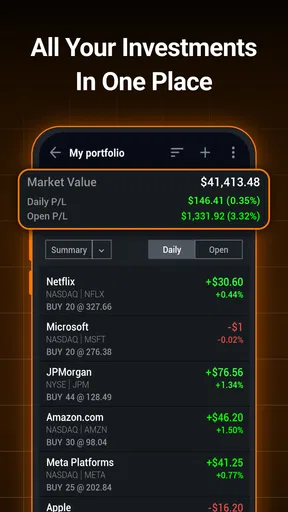
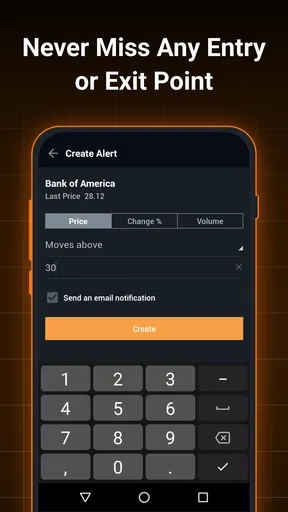
The customizable watchlists are another game-changer. You can tailor your lists to track your favorite stocks and get instant alerts. This feature is perfect for those of us who like to keep a close eye on our investments without having to sift through irrelevant information.
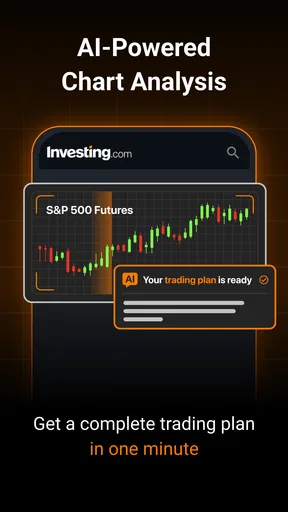
For the data geeks among us, the app provides detailed charts with various technical analysis tools. You can apply different indicators to help predict market movements. It’s like having a mini Bloomberg terminal at your fingertips.
News and Insights
Keeping up with the latest market news is crucial, and Investing.com does not disappoint. The app offers a continuous stream of news from trusted sources. Whether it's breaking news, economic calendar updates, or earnings reports, you’re always in the loop.
I particularly enjoy the opinion pieces and analysis articles. They offer valuable insights from financial experts, which can be incredibly helpful in making informed decisions. It’s like having a coffee chat with a market analyst every morning.
User Experience
The app runs smoothly on both Android and iOS, with no noticeable lags or crashes during my time with it. The interface is designed with user-friendliness in mind. Even if you’re not tech-savvy, you’ll find it easy to use.
One minor gripe is the occasional ads, but they’re not too intrusive. Plus, there’s an option to upgrade to an ad-free version, which is worth considering if you’re going to use the app extensively.
Final Thoughts
In the ever-volatile world of investing, having reliable tools is essential. Investing.com: Stock Market proves to be a robust companion for anyone looking to dive deeper into the financial markets. Its extensive features, real-time data, and insightful articles provide everything you need to stay informed and make smart investment choices.
So, if you're aiming to elevate your trading game or just want to keep up with market trends, give this app a try. It’s like having a personal financial advisor with you 24/7, without the hefty fees!
Who will get the most from it?
I think the best fit is someone who follows a manageable set of companies or markets and wants one place to check prices, charts, and related coverage. A casual investor can use it to build a routine around a few holdings, while a more active trader may appreciate being able to move from a quote to a chart and then to a relevant headline. Its broad coverage also helps people who follow more than one asset class, though that breadth is most useful when they already know what they want to monitor.
For an everyday example, imagine checking a few holdings before work, noticing that one has moved sharply, and then using its chart and the news feed to see whether there is a company-specific story or a wider market event. I would save a decision for later if the explanation remains unclear. That is a stronger use of the app than reacting to a red or green number on its own: it turns a quick glance into a small, structured research check without pretending to settle the investment question.
How it compares with other ways to follow markets
Compared with a broker’s app, this is more naturally a market-monitoring and information companion than the place I would rely on to manage every part of an account. A broker is usually the more direct choice when the task is placing or reviewing trades. Compared with a general news app, this one keeps financial instruments and market context closer to the reading experience. A dedicated charting platform may offer a more focused workspace for intensive analysis, while a specialist news source may be preferable if editorial depth is the main priority. The trade-off here is convenience across several kinds of market information rather than a single best-in-class tool for every task.
That distinction is useful when deciding whether to install it alongside another app. If all I need is an occasional share price, a simple quote tool may be less distracting. If I already have a broker I trust but want broader market context and a separate watchlist, this app can fill that gap. I would not choose it as a replacement for a carefully maintained portfolio record or as a promise of personalized financial guidance.
Costs, expectations, and the final call
The app is free to download, with in-app purchases listed from $0.99 to $538.80 per item. I would check the purchase details inside the app before paying, and decide whether any paid option solves a problem I actually have. The free starting point makes it easy to explore, but the presence of purchases means I would not assume every extra is included. It has a 4.6 average from around 988,000 ratings, and more than 50 million installs; those figures suggest broad use, but they cannot tell me whether its layout or level of detail will suit a particular person.
Its Everyone age rating makes it broadly accessible, but financial content still deserves adult judgement: market analysis is not a guaranteed outcome, and a persuasive chart or article cannot remove investment risk. I would recommend it to readers who want a flexible market dashboard and are willing to filter what they see. I would steer away from it if constant price changes make you anxious, if you want a simple savings or budgeting tool, or if you expect an app to tell you exactly what to trade. For my own use, its strongest role is keeping a watchlist and relevant market context close at hand; its weakest role would be asking it to make the decision for me.
Pros
- Comprehensive market data coverage.
- User-friendly interface for beginners.
- Real-time alerts and notifications.
- Wide range of financial instruments.
- Customizable watchlists and portfolios.
Cons
- Ads can be intrusive at times.
- Premium features require subscription.
- Occasional lag in data updates.
- Complex charts may overwhelm novices.
- Limited offline functionality.
FAQs for Investing.com: Stock Market
What features does Investing.com: Stock Market offer?
Investing.com: Stock Market provides a comprehensive suite of features including real-time quotes for over 100,000 financial instruments traded on more than 70 global exchanges. It offers live charts, financial news, technical analysis, and portfolio management tools. Users can also access economic calendars and receive alerts for specific stock movements and financial news.
Is Investing.com: Stock Market free to use?
Yes, Investing.com: Stock Market is free to download and use. However, it offers a premium subscription option that unlocks additional features such as an ad-free experience, advanced technical analysis tools, and more in-depth market data. This subscription is optional and can enhance the user experience.
How user-friendly is the Investing.com app for beginners?
Investing.com is designed with user-friendliness in mind, making it accessible for beginners. The interface is intuitive, and the app provides educational resources such as articles and tutorials to help new investors understand market dynamics. Navigation is straightforward, allowing users to easily find information on stocks, commodities, and currencies.
What types of alerts can I set up on the app?
Users can customize alerts for a variety of events including stock price movements, economic news releases, and specific technical indicators. These alerts can be tailored to individual preferences, ensuring that users receive timely updates on the financial events that matter most to them, directly through push notifications or email.
Does Investing.com offer support for global markets?
Yes, Investing.com provides data and information from a vast array of global markets. Users can access real-time data from exchanges in North America, Europe, Asia, and more. This global reach ensures that investors can stay informed about international market trends and make well-informed decisions regardless of their location.


